Window_Selectableの共通処理をまとめるSceneを作ってみた
Window_Selectableでボタンを押したときの処理を作るには、以下のように setHandler メソッドを使って、実行したいメソッドを指定する必要があります。
|
1 2 3 4 5 6 7 8 9 10 11 12 13 14 15 16 17 18 19 20 21 22 23 24 25 |
Scene_IndexMenuBase.prototype.create = function(){ Scene_MenuBase.prototype.create.call(this); // ウィンドウの生成 this.createIndexWindow(); }; // 一覧ウィンドウの生成 Scene_IndexMenuBase.prototype.createIndexWindow = function(){ //ボタンを押した時に呼び出すメソッドの設定 this._indexWindow.setHandler('ok', this.onIndexOk.bind(this)); this._indexWindow.setHandler('cancel', this.onIndexCancel.bind(this)); this.addWindow(this._indexWindow); }; // 一覧で決定した時の処理 Scene_IndexMenuBase.prototype.onIndexOk = function(){ //ボタンを押した時の処理 }; // 一覧でキャンセルした時の処理 Scene_IndexMenuBase.prototype.onIndexCancel = function(){ this.popScene(); }; |
ボタンが1つならまだいいですが、確認ボタンなども作ったりするとボタン処理を書くのが面倒です。
そこでキャンセルした時などの共通処理をまとめるSceneを定義したIndexMenuBase.jsを作ってみました。
Window_Selectableの共通処理をまとめるScene
|
1 2 3 4 5 6 7 8 9 10 11 12 13 14 15 16 17 18 19 20 21 22 23 24 25 26 27 28 29 30 31 32 33 34 35 36 37 38 39 40 41 42 43 44 45 46 47 48 49 50 51 52 53 54 55 56 57 58 59 60 61 62 63 64 65 66 67 68 69 70 71 72 73 74 75 76 77 78 79 80 81 82 83 84 85 86 87 88 89 90 91 92 93 94 95 96 97 98 99 100 101 102 103 104 105 106 107 108 109 110 111 112 113 114 115 116 117 118 119 120 121 122 123 124 125 126 127 128 129 130 131 132 133 134 135 136 137 138 139 140 141 142 143 144 145 146 147 148 149 150 151 152 153 154 155 156 157 158 159 160 161 162 163 164 165 166 167 168 169 170 171 172 173 174 175 176 177 178 179 180 181 182 183 184 185 186 187 188 189 190 191 192 193 194 195 196 197 198 199 200 201 202 203 204 205 206 207 208 209 210 211 212 213 214 215 216 |
//============================================================================= // IndexMenuBase.js // 一覧ウィンドウのボタン処理を共通化 //============================================================================= // ----------シーンの定義 ここから ---------- function Scene_IndexMenuBase(){ this.initialize.apply(this, arguments); } Scene_IndexMenuBase.prototype = Object.create(Scene_MenuBase.prototype); Scene_IndexMenuBase.prototype.constructor = Scene_IndexMenuBase; Scene_IndexMenuBase.prototype.initialize = function(indexWindow){ this._confirm = true; this._indexWindow = indexWindow; Scene_MenuBase.prototype.initialize.call(this); }; // =============================================== // 1.ウィンドウの生成・追加 // =============================================== Scene_IndexMenuBase.prototype.create = function(){ Scene_MenuBase.prototype.create.call(this); // ウィンドウの生成・追加 this.addIndexWindow(); this.createConfirmWindow(); // 確認ウィンドウは非表示 this.hideConfirmWindow(); }; // 一覧ウィンドウの追加 Scene_IndexMenuBase.prototype.addIndexWindow = function(){ //ボタンを押した時の設定 this._indexWindow.setHandler('ok', this.onIndexOk.bind(this)); this._indexWindow.setHandler('cancel', this.onIndexCancel.bind(this)); this.addWindow(this._indexWindow); }; // 確認メッセージウィンドウの生成と追加 Scene_IndexMenuBase.prototype.createConfirmWindow = function(){ this._confirmWindow = new Window_Confirm(); this._confirmCommand = new Window_CommandYesNo(); // ボタンを押した時の設定 this._confirmCommand.setHandler('commandYes', this.onConfirmYes.bind(this)); this._confirmCommand.setHandler('commandNo', this.onConfirmNo.bind(this)); this._confirmCommand.setHandler('cancel', this.onConfirmCancel.bind(this)); this.addWindow(this._confirmWindow); this.addWindow(this._confirmCommand); }; // =============================================== // 2.ボタン処理 // =============================================== // =============================================== // 2-1. 一覧ウィンドウのボタン処理 // =============================================== // 一覧で決定ボタンを押した時の処理 Scene_IndexMenuBase.prototype.onIndexOk = function(){ if(this._confirm){ // 確認メッセージをセットして呼びだす this._confirmWindow.setMessage(this.confirmMessage()); this.showConfirmWindow(); } else { this.execute(); } }; // 一覧でキャンセルした時の処理 Scene_IndexMenuBase.prototype.onIndexCancel = function(){ this.popScene(); }; // =============================================== // 2-2. 確認コマンドウィンドウのボタン処理 // =============================================== // 確認コマンドで「はい」を押した時の処理 Scene_IndexMenuBase.prototype.onConfirmYes = function(){ this.execute(); }; // 確認コマンドで「いいえ」を押した時の処理 Scene_IndexMenuBase.prototype.onConfirmNo = function(){ this.hideConfirmWindow(); }; // 確認コマンドでキャンセルした時の処理 Scene_IndexMenuBase.prototype.onConfirmCancel = function(){ this.hideConfirmWindow(); }; // =============================================== // 3.ウィンドウ制御 // =============================================== // 確認ウィンドウを表示する Scene_IndexMenuBase.prototype.showConfirmWindow = function(){ this._confirmWindow.show(); this._confirmCommand.show(); this._confirmCommand.activate(); }; // 確認ウィンドウを非表示にする Scene_IndexMenuBase.prototype.hideConfirmWindow = function(){ this._confirmWindow.hide(); this._confirmCommand.hide(); this._confirmCommand.deactivate(); this._indexWindow.activate(); }; // =============================================== // 4.設定 // =============================================== // 一覧で決定ボタンを押した時に確認メッセージを表示するか? // デフォルトはtrue Scene_IndexMenuBase.prototype.setConfirm = function(confirm){ this._confirm = confirm; }; // =============================================== // 5.オーバーライド用メソッド // =============================================== // 確認用メッセージ Scene_IndexMenuBase.prototype.confirmMessage = function(){ return this._confirmWindow.message(); }; // 実行する時の処理(確認で「はい」を押したか、確認がオフの時に実行) Scene_IndexMenuBase.prototype.execute = function(){ this.hideConfirmWindow(); }; // ----------シーンの定義 ここまで ---------- // ----------確認メッセージウィンドウの定義 ここから ---------- function Window_Confirm(){ this.initialize.apply(this, arguments); } Window_Confirm.prototype = Object.create(Window_Base.prototype); Window_Confirm.prototype.constructor = Window_Confirm; Window_Confirm.prototype.initialize = function(x, y, width, height){ this._message = "本当に実行しますか?"; Window_Base.prototype.initialize.call(this, x, y, width, height); }; // 確認メッセージ設定 Window_Confirm.prototype.setMessage = function(message){ this._message = message; this.refresh(); }; Window_Confirm.prototype.message = function(){ return this._message; }; // 更新処理 Window_Confirm.prototype.refresh = function(){ this.contents.clear(); this.createContents(); this.drawText(this._message, 0, 0, this.width); }; // ----------確認メッセージウィンドウの定義 ここまで ---------- // ----------確認コマンドウィンドウの定義 ここから ---------- function Window_CommandYesNo(){ this.initialize.apply(this, arguments); }; Window_CommandYesNo.prototype = Object.create(Window_Command.prototype); Window_CommandYesNo.prototype.constructor = Window_CommandYesNo; Window_CommandYesNo.prototype.initialize = function(x, y){ this._yesLabel = "はい"; this._noLabel = "いいえ"; this._defaultCommandIndex = 0; Window_Command.prototype.initialize.call(this, x, y); }; Window_CommandYesNo.prototype.makeCommandList = function(){ this.addCommand(this._yesLabel, 'commandYes', true); this.addCommand(this._noLabel, 'commandNo', true); }; Window_CommandYesNo.prototype.setYesLabel = function(label){ this._yesLabel = label; this.refresh(); }; Window_CommandYesNo.prototype.setNoLabel = function(label){ this._noLabel = label; this.refresh(); }; Window_CommandYesNo.prototype.setDefaultCommandIndex = function(index){ this._defaultCommandIndex = index; }; Window_CommandYesNo.prototype.activate = function(){ Window_Command.prototype.activate.call(this); this.select(this._defaultCommandIndex); }; // ----------確認コマンドウィンドウの定義 ここまで ---------- |
IndexMenuBase.jsを再利用して建設メニューっぽいものを作る
IndexMenuBase.jsを利用して、建設メニューを表示するBuildMenu.jsを作ってみました。
サンプルコード
|
1 2 3 4 5 6 7 8 9 10 11 12 13 14 15 16 17 18 19 20 21 22 23 24 25 26 27 28 29 30 31 32 33 34 35 36 37 38 39 40 41 42 43 44 45 46 47 48 49 50 51 52 53 54 55 56 57 58 59 60 61 62 63 64 65 66 67 68 69 70 71 72 73 74 75 76 77 78 79 80 81 82 83 84 85 86 87 88 89 90 91 92 93 94 95 96 97 98 99 100 101 102 103 104 105 106 107 108 109 110 111 112 113 114 115 116 117 118 119 120 121 122 123 124 125 126 127 128 129 130 131 132 133 134 135 136 137 138 139 140 141 142 143 144 145 146 147 148 149 150 151 152 153 154 155 156 157 158 159 160 161 162 163 164 165 166 167 168 169 170 171 172 173 174 175 176 177 178 179 180 181 182 183 184 185 186 187 188 189 190 191 192 193 194 195 196 197 198 199 200 201 202 203 204 205 206 207 208 209 210 211 212 213 214 215 216 217 218 219 220 221 222 223 224 225 226 227 228 229 230 231 232 233 234 235 236 237 238 239 240 241 242 243 244 245 246 247 248 |
//============================================================================= // BuildMenu.js // IndexMenuBase.jsを使って建設メニューを作るサンプル //============================================================================= (function(){ 'use strict'; var pluginName = "BuildMenu"; // ----------プラグインコマンドの定義 ここから ---------- var _Game_Interpreter_pluginCommand = Game_Interpreter.prototype.pluginCommand; Game_Interpreter.prototype.pluginCommand = function(command, args){ _Game_Interpreter_pluginCommand.call(this, command, args); if(command === pluginName){ switch(args[0]){ case 'open': SceneManager.push(Scene_BuildMenu); break; } } }; // ----------プラグインコマンドの定義 ここまで ---------- // ----------シーンの定義 ここから ---------- // Scene_IndexMenuBaseを再利用 function Scene_BuildMenu(){ this.initialize.apply(this, arguments); } Scene_BuildMenu.prototype = Object.create(Scene_IndexMenuBase.prototype); Scene_BuildMenu.prototype.constructor = Scene_BuildMenu; Scene_BuildMenu.prototype.initialize = function(){ this._indexWindow = new Window_BuildMenu(0, 100, 300, 400); Scene_IndexMenuBase.prototype.initialize.call(this, this._indexWindow); }; // =============================================== // 1.ウィンドウの生成・追加 // =============================================== Scene_BuildMenu.prototype.create = function(){ Scene_IndexMenuBase.prototype.create.call(this); // ウィンドウの生成・追加 this.createTitleWindow(); this.createGoldWindow(); this.createHelpWindow(); this._indexWindow.setMoney(this._goldWindow.value()); // 確認ウィンドウの位置調整 this.setConfirmWindowPosition(); }; // タイトルウィンドウ(Window_Help)の生成 Scene_BuildMenu.prototype.createTitleWindow = function(){ this._titleWindow = new Window_Help(1); this._titleWindow.width = this._indexWindow.width; this._titleWindow.setText("建設メニュー"); this.addWindow(this._titleWindow); }; // ゴールドウィンドウ(Window_Gold)の生成 Scene_BuildMenu.prototype.createGoldWindow = function(){ this._goldWindow = new Window_Gold(0, 0); this._goldWindow.x = Graphics.width - this._goldWindow.width; this.addWindow(this._goldWindow); }; // ヘルプウィンドウ(Window_BuildHelp)の生成 Scene_BuildMenu.prototype.createHelpWindow = function(){ var x = this._indexWindow.x + this._indexWindow.width + 20; var y = this._indexWindow.y; var width = 480; var height = this._indexWindow.height; this._helpWindow = new Window_BuildHelp(x, y, width, height); this._indexWindow.setHelpWindow(this._helpWindow); this.addWindow(this._helpWindow); }; // 確認ウィンドウの位置調整 Scene_BuildMenu.prototype.setConfirmWindowPosition = function(){ // 確認メッセージウィンドウ this._confirmWindow.x = 0; this._confirmWindow.y = this._indexWindow.y + this._indexWindow.height + 10; this._confirmWindow.width = Graphics.width - 280; this._confirmWindow.height = 110; // 確認コマンドの位置 this._confirmCommand.x = this._confirmWindow.x + this._confirmWindow.width + 20; this._confirmCommand.y = this._confirmWindow.y; this._confirmWindow.refresh(); }; // 確認メッセージのオーバーライド Scene_BuildMenu.prototype.confirmMessage = function(){ return this._indexWindow.item().name() + "を作成しますか?"; }; // 一覧実行処理のオーバーライド Scene_BuildMenu.prototype.execute = function(){ console.log("-----ここに実行した時の処理を書く-----"); var buildItem = this._indexWindow.item(); $gameSwitches.setValue(buildItem.id(), true); $gameParty.loseGold(buildItem.price()); this._goldWindow.refresh(); this._indexWindow.setMoney(this._goldWindow.value()); Scene_IndexMenuBase.prototype.execute.call(this); }; // ----------シーンの定義 ここまで ---------- // ----------一覧ウィンドウの定義 ここから ---------- function Window_BuildMenu (){ this.initialize.apply(this, arguments); }; Window_BuildMenu.prototype = Object.create(Window_Selectable.prototype); Window_BuildMenu.prototype.constructor = Window_BuildMenu; Window_BuildMenu.prototype.initialize = function(x, y, width, height){ this._money = 0; this.createListItem(); Window_Selectable.prototype.initialize.call(this, x, y, width, height); this.select(0); this.activate(); this.refresh(); }; Window_BuildMenu.prototype.maxItems = function(){ return this._data ? this._data.length : 0; }; // 選択しているアイテム // this._dataが設定されていない時はnullが返る Window_BuildMenu.prototype.item = function(){ return this._data ? this._data[this.index()]: null; }; Window_BuildMenu.prototype.isCurrentItemEnabled = function() { return this.isEnabled(this.item()); }; Window_BuildMenu.prototype.isEnabled = function(item){ return this._money >= item.price(); }; Window_BuildMenu.prototype.setMoney = function(money){ this._money = money; this.refresh(); }; Window_BuildMenu.prototype.createListItem = function(){ this._data = []; this._data.push(new BuildItem(1, '木の家', 1000, '住民が増える')); this._data.push(new BuildItem(2, '農場', 5000, '家畜が飼える')); this._data.push(new BuildItem(3, '診療所', 8000, 'HPの回復ができる')); }; // 一覧の表示をオーバーライド Window_BuildMenu.prototype.drawItem = function(index){ var buildItem = this._data[index]; var rect = this.itemRect(index); this.changePaintOpacity(this.isEnabled(buildItem)); this.drawText(buildItem.name(), rect.x, rect.y, 100); }; Window_BuildMenu.prototype.updateHelp = function(){ this.setHelpWindowItem(this.item()); }; // ----------一覧ウィンドウの定義 ここまで ---------- // ----------ヘルプウィンドウの定義 ここから ---------- function Window_BuildHelp(){ this.initialize.apply(this, arguments); }; Window_BuildHelp.prototype = Object.create(Window_Help.prototype); Window_BuildHelp.prototype.constructor = Window_BuildHelp; Window_BuildHelp.prototype.initialize = function(x, y, width, height){ this._item = null; Window_Base.prototype.initialize.call(this, x, y, width, height); }; Window_BuildHelp.prototype.setItem = function(item){ this._item = item; this.refresh(); }; Window_BuildHelp.prototype.refresh = function(){ this.contents.clear(); this.drawContent(); }; Window_BuildHelp.prototype.drawContent = function(){ if(this._item){ var buildItem = this._item; var units = TextManager.currencyUnit; this.drawText(buildItem.name(), 0, 0, this.width); this.drawText("費用: " + this._item.price() + units, 0, this.lineHeight() * 2, this.width); this.drawText("効果: ", 0, this.lineHeight() * 4, this.width); this.drawText(buildItem.description(), 20, this.lineHeight() * 5, this.width); } }; // ----------ヘルプウィンドウの定義 ここから ---------- // ----------建物オブジェクトの定義 ここから ---------- function BuildItem(id, name, price, description){ this._id = id; this._name = name; this._price = price; this._description = description; }; BuildItem.prototype.id = function(){ return this._id; }; BuildItem.prototype.name = function(){ return this._name; }; BuildItem.prototype.price = function(){ return this._price; }; BuildItem.prototype.description = function(){ return this._description; }; // ----------建物オブジェクトの定義 ここまで ---------- })(); |
サンプルコード実行結果


確認ウィンドウの生成やボタンを押したときの処理をIndexMenuBase.jsにまとめたおかげで、BuildMenu.jsの記述がすこし短くなりました。
プラグインを追加するときは、IndexMenuBase.jsをBuildMenu.jsの前に読み込む必要があります。
ツール→プラグイン管理のリストの上から順番に読み込まれるので、IndexMenuBase→BuildMenuの順番にしておきます。

確認ウィンドウで「はい」を押した時にはScene_IndexMenuBaseの execute メソッドが実行されるので、呼び出し側(Scene_BuildMenu)でexecuteメソッドを上書き(オーバーライド)してやればいいです。
確認ウィンドウに表示されるメッセージは、
confirmMessageメソッドで定義しています。
こちらもオーバーライドすることで、好きなメッセージを表示することができます。
選択している項目は this._indexWindow.item()で取得できます。
サンプルコードでは、BuildItemという独自のクラス(オブジェクト)を作っています。
確認ウィンドウを表示するかしないかは setConfirmメソッドを使って切り替えることができます。
|
1 2 3 4 5 6 7 8 9 10 11 12 13 14 15 16 17 18 |
// =============================================== // 1.ウィンドウの生成・追加 // =============================================== Scene_BuildMenu.prototype.create = function(){ Scene_IndexMenuBase.prototype.create.call(this); // ウィンドウの生成・追加 this.createTitleWindow(); this.createGoldWindow(); this.createHelpWindow(); this._indexWindow.setMoney(this._goldWindow.value()); // 確認ウィンドウの位置調整 // this.setConfirmWindowPosition(); // 一覧で決定した時に確認をしない this.setConfirm(false); }; |
確認コマンドは、はい/いいえの文言と、デフォルトの選択肢を変更できます。
|
1 2 3 4 5 6 7 8 9 10 11 12 13 14 15 16 17 |
Scene_BuildMenu.prototype.create = function(){ Scene_IndexMenuBase.prototype.create.call(this); // ウィンドウの生成・追加 this.createTitleWindow(); this.createGoldWindow(); this.createHelpWindow(); this._indexWindow.setMoney(this._goldWindow.value()); // 確認ウィンドウの位置調整 this.setConfirmWindowPosition(); // 確認コマンドの表示文字を変更 this._confirmCommand.setYesLabel('OK!'); this._confirmCommand.setNoLabel('ダメ!'); this._confirmCommand.setDefaultCommandIndex(1); }; |
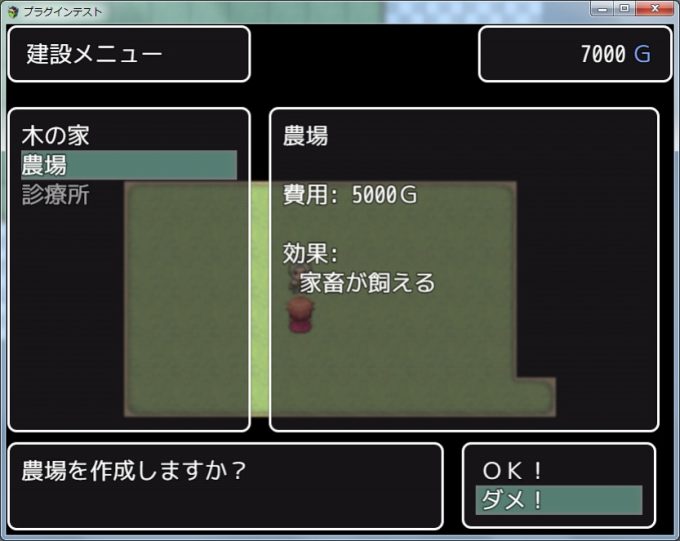
データを変えれば、いろいろなメニューを作ることができます。