RPGツクールMVのプラグインで一覧から項目を選択するウィンドウを作る
RPGツクールMVのWindow_Selectableクラスを使うと、項目を選択可能なウィンドウを作ることができます。
この記事ではサンプルとしてアクターをお金で雇えるプラグインEmployActor.jsを作りつつ、Window_Selectableの主要なメソッドを紹介します。
このブログの記事は厳密な正確さよりも、わかりやすさを重視して書いてあるので、あらかじめご了承ください。
EmployActor.jsの仕様をザックリまとめておきます。
- アクターのメモ欄に<EASalary:>タグで賃金を設定する
- プラグインコマンドopenでアクターの一覧、所持金ウィンドウを開く
- 雇いたいアクターにカーソルをあわせて決定ボタンを押すと「雇う」コマンドを表示する
- 雇うコマンドで決定ボタンを押すと、所持金が減って選択したアクターが仲間に加わる
- お金が足りない場合とパーティ人数がいっぱいの場合は、アクターの一覧をグレーアウトする
完成イメージとしては、こんな感じ。

必要なものはシーン、一覧ウィンドウ、所持金ウィンドウ、コマンドウィンドウの4つです。
シーンはScene_MenuBaseを元にしてScene_EmployActorを作っていきます。
所持金を表示するウィンドウはWindow_Goldというクラスがあるので、それをそのまま使います。
アクターの一覧をWindow_Selectableを元にしたWindow_EmployActorIndexクラス、コマンドウィンドウをWindow_Commandを元にしたWindow_EmployActorCommandクラスで作ります。
| シーン・ウィンドウ | クラス名 |
|---|---|
| シーン | Scene_EmployActor (Scene_MenuBaseをベースに作成) |
| 一覧ウィンドウ | Window_EmployActorIndex (Window_Selectableをベースに作成) |
| 所持金ウィンドウ | Window_Gold |
| コマンドウィンドウ | Window_EmployActorCommand (Window_Commandをベースに作成) |
ウィンドウ作成とボタンを押した時の処理を定義する
まずはScene_EmployActorにウィンドウの生成処理を作り、ボタンを押した時に呼び出す処理を定義していきます。
サンプルコード1
|
1 2 3 4 5 6 7 8 9 10 11 12 13 14 15 16 17 18 19 20 21 22 23 24 25 26 27 28 29 30 31 32 33 34 35 36 37 38 39 40 41 42 43 44 45 46 47 48 49 50 51 52 53 54 55 56 57 58 59 60 61 62 63 64 65 66 67 68 69 70 71 72 73 74 75 76 77 78 79 80 81 82 83 84 85 86 87 88 89 90 91 92 93 94 95 96 97 98 99 100 101 102 103 104 105 106 107 108 109 110 111 112 113 114 115 116 117 118 119 120 121 122 123 124 125 126 127 128 129 130 131 132 133 134 135 136 137 138 139 140 141 142 143 144 145 146 147 148 149 150 151 152 153 154 155 156 157 158 159 160 161 162 163 164 165 166 167 168 169 170 171 172 173 174 175 176 177 178 179 180 181 182 |
(function(){ 'use strict'; var pluginName = "EmployActor"; // ----------プラグインコマンドの定義 ここから ---------- var _Game_Interpreter_pluginCommand = Game_Interpreter.prototype.pluginCommand; Game_Interpreter.prototype.pluginCommand = function(command, args){ _Game_Interpreter_pluginCommand.call(this, command, args); if(command === pluginName){ switch(args[0]){ case 'open': SceneManager.push(Scene_EmployActor); break; } } }; // ----------プラグインコマンドの定義 ここまで ---------- // ----------Sceneの定義 ここから ---------- function Scene_EmployActor(){ this.initialize.apply(this, arguments); } Scene_EmployActor.prototype = Object.create(Scene_MenuBase.prototype); Scene_EmployActor.prototype.constructor = Scene_EmployActor; Scene_EmployActor.prototype.initialize = function(){ Scene_MenuBase.prototype.initialize.call(this); }; // ウィンドウの作成 Scene_EmployActor.prototype.create = function(){ Scene_MenuBase.prototype.create.call(this); this.createIndexWindow(); this.createGoldWindow(); this.createCommandWindow(); this.activateIndexWindow(); }; // アクター一覧ウィンドウ作成処理 Scene_EmployActor.prototype.createIndexWindow = function(){ var wx = 0; var wy = 0; var ww = Graphics.width / 3; var wh = Graphics.height; this._indexWindow = new Window_EmployActorIndex(wx, wy, ww, wh); this._indexWindow.setHandler('ok', this.onIndexOk.bind(this)); this._indexWindow.setHandler('cancel', this.onIndexCancel.bind(this)); this.addWindow(this._indexWindow); }; // 所持金ウィンドウ作成処理 Scene_EmployActor.prototype.createGoldWindow = function(){ this._goldWindow = new Window_Gold(0, 0); var wx = Graphics.width - this._goldWindow.width; this._goldWindow.move(wx, 0, this._goldWindow.width, this._goldWindow.height); this.addWindow(this._goldWindow); }; // コマンドウィンドウ作成処理 Scene_EmployActor.prototype.createCommandWindow = function(){ this._commandWindow = new Window_EmployCommand(0, 0); var wx = Graphics.width - this._commandWindow.width; var wy = Graphics.height - this._commandWindow.height; this._commandWindow.move(wx, wy, this._commandWindow.width, this._commandWindow.height); this._commandWindow.setHandler('employ', this.onCommandEmploy.bind(this)); this._commandWindow.setHandler('cancel', this.onCommandCancel.bind(this)); this.hideCommandWindow(); this.addWindow(this._commandWindow); }; // インデックスウィンドウで決定ボタンを押したときの処理 Scene_EmployActor.prototype.onIndexOk = function(){ this.activateCommandWindow(); }; // インデックスウィンドウでキャンセルボタンを押したときの処理 Scene_EmployActor.prototype.onIndexCancel = function(){ this.popScene(); }; // コマンドウィンドウで雇うボタンを押したときの処理 Scene_EmployActor.prototype.onCommandEmploy = function(){ this.hideCommandWindow(); this.employ(); this.activateIndexWindow(); }; // コマンドウィンドウでキャンセルボタンを押したときの処理 Scene_EmployActor.prototype.onCommandCancel = function(){ this.hideCommandWindow(); this._indexWindow.activate(); }; // 雇うコマンド Scene_EmployActor.prototype.employ = function(){ // あとで書く }; // 一覧ウィンドウを表示 Scene_EmployActor.prototype.activateIndexWindow = function(){ this._indexWindow.activate(); this._indexWindow.refresh(); }; // コマンドウィンドウを表示 Scene_EmployActor.prototype.activateCommandWindow = function(){ this._commandWindow.activate(); this._commandWindow.select(0); this._commandWindow.show(); }; // コマンドウィンドウを非表示 Scene_EmployActor.prototype.hideCommandWindow = function(){ this._commandWindow.deselect(); this._commandWindow.deactivate(); this._commandWindow.hide(); }; // ----------Sceneの定義 ここまで ---------- // ----------インデックスウィンドウの定義 ここから ---------- function Window_EmployActorIndex(){ this.initialize.apply(this, arguments); }; Window_EmployActorIndex.prototype = Object.create(Window_Selectable.prototype); Window_EmployActorIndex.prototype.constructor = Window_EmployActorIndex; Window_EmployActorIndex.prototype.initialize = function(x, y, width, height){ Window_Selectable.prototype.initialize.call(this, x, y, width, height); this.refresh(); this.select(0); this.activate(); }; // ----------インデックスウィンドウの定義 ここまで ---------- // ----------コマンドウィンドウの定義 ここから ---------- function Window_EmployCommand(){ this.initialize.apply(this, arguments); } Window_EmployCommand.prototype = Object.create(Window_Command.prototype); Window_EmployCommand.prototype.constructor = Window_EmployCommand; Window_EmployCommand.prototype.initialize = function(x, y){ Window_Command.prototype.initialize.call(this, x, y); }; // コマンドを設定 Window_EmployCommand.prototype.makeCommandList = function(){ this.addCommand('雇う', 'employ', true); }; // ----------コマンドウィンドウの定義 ここまで ---------- })(); |
ウィンドウを3つも作ったからコードが長いですが、やっていることは単純です。
プラグインコマンドの定義では、「EmployActor open」とプラグインコマンドを入力したらSceneManagerにScene_EmployActorをpushし、シーンを呼び出すようにしています。
Scene_EmployActorではウィンドウごとにcreate〇〇Windowメソッドを作り、 create メソッドから呼び出しています。
SceneManagerにpushした時にシーンのcreateメソッドが呼び出され、ウィンドウが生成されます。
雇うボタンは最初は見えている必要はないのでコマンドウィンドウは最初は非表示にしておき、一覧ボタンで決定ボタンが押されたら表示するようにします。
ウィンドウ生成処理の中で、一覧ウィンドウとコマンドウィンドウはキーが押されたときに呼び出される処理を setHandler で定義しています。
各ボタンの処理は、アクティブなウィンドウを切り替えるのが主な内容です。
ウィンドウ表示・非表示はメソッド化しておけば、コードを何回も書かなくてすみます。
それぞれ activateIndexWindow、 activateCommandWindow、 hideCommandWindowというメソッドを作りました。
アクター一覧ウィンドウ(indexWindow)のボタン処理
アクター一覧ウィンドウでは決定ボタンが押されたら onIndexOk、キャンセルボタンが押されたら onIndexCancelを呼び出します。
onIndexOkでは activateCommandWindowを呼び出し、コマンドウィンドウを表示してアクティブにします。
onIndexCancelでは popSceneメソッドを呼び出してシーンを終了します。
コマンドウィンドウ(commandWindow)のボタン処理
コマンドウィンドウでは雇うボタンが押されたら onCommandEmploy、キャンセルボタンが押されたら onCommandCancelを呼び出します。
onCommandEmployでは雇うボタンを非表示にして employメソッドを呼び出します。
employメソッドの内容はあとで考えるのでメソッド名だけ先に定義し、 // あとで書く というコメントを書いてあります。
employメソッドを呼び出したあとに activateIndexWindowを呼び出して、一覧ウィンドウをアクティブにします。
onCommandCancelでは hideCommandWindowでコマンドボタンを非表示にして、一覧ウィンドウをアクティブにします。
ウィンドウの定義
ウィンドウの定義は一覧ウィンドウはあとでいろいろつけたしていきますが、とりあえずクラスの定義とinitializeメソッドの中で refreshメソッドの呼び出しをするようにしています。
refreshメソッドは、ウィンドウの内容を再描画するメソッドです。
コマンドウィンドウの定義では、雇うコマンドをemployというシンボルで追加しています。
実行してみると、ウィンドウが表示されます。
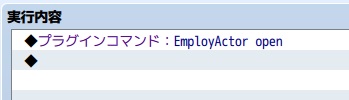
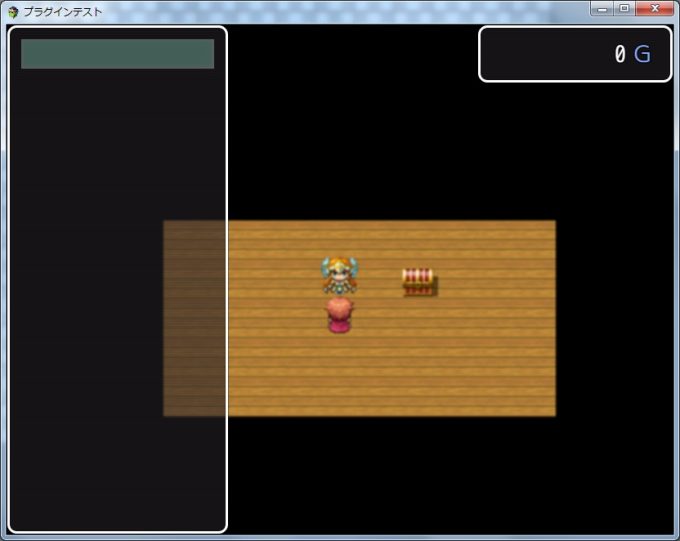
一覧ウィンドウにはまだ内容が表示されませんが、決定ボタンを押すと雇うボタンが表示されます。
(employメソッドの処理をまだ書いていないので、ボタンを押してもなにも起こりません)
雇うボタンが出た状態でキャンセルボタンを押すと雇うボタンが消え、カーソルが一覧ウィンドウに戻ります。
その状態で再度キャンセルボタンを押すと、ウィンドウが閉じます。
一覧ウィンドウに項目を表示する
アクターの一覧を取得する
一覧ウィンドウに表示する内容は、Window_EmployActorIndexの配列に入れておきます。
表示したいのはアクターの一覧なので、アクターオブジェクトの入った配列を作ります。
サンプルコード2-1
長くなるのでWindow_EmployActorIndexのところだけ抜粋しています。
追加した部分は黄色でハイライトしています。
|
1 2 3 4 5 6 7 8 9 10 11 12 13 14 15 16 17 18 19 20 21 22 23 24 25 26 27 28 29 30 31 32 33 34 35 36 37 38 39 40 41 42 43 44 45 46 47 48 49 50 51 52 53 54 55 56 57 58 59 60 61 |
// ----------インデックスウィンドウの定義 ここから ---------- function Window_EmployActorIndex(){ this.initialize.apply(this, arguments); }; Window_EmployActorIndex.prototype = Object.create(Window_Selectable.prototype); Window_EmployActorIndex.prototype.constructor = Window_EmployActorIndex; Window_EmployActorIndex.prototype.initialize = function(x, y, width, height){ Window_Selectable.prototype.initialize.call(this, x, y, width, height); this.refresh(); this.select(0); this.activate(); }; // 再描画処理 Window_EmployActorIndex.prototype.refresh = function(){ this.createContents(); this.makeActorList(); this.drawAllItems(); }; // アクターリストを作る Window_EmployActorIndex.prototype.makeActorList = function(){ this._list = []; // $dataActors[0]はnullなので1から取得 for(var i = 1; i < $dataActors.length; i++ ){ var actor = $dataActors[i]; if(hasTag(actor.meta, 'EASalary') && !isJoinedParty(actor)){ this._list.push(actor); } } }; // 指定したタグがあるか function hasTag(obj, tagName){ for(var propertyName in obj){ if(propertyName === tagName){ return true; } } return false; } // パーティに参加しているか function isJoinedParty(actor){ for(var i = 0; i < $gameParty._actors.length; i++ ){ if($gameParty._actors[i] === actor.id){ return true; } } return false; } // ----------インデックスウィンドウの定義 ここまで ---------- |
refreshメソッドの中でウィンドウの内容の消去、アクター一覧の作成、項目を書きだす処理を呼び出しています。
アクター一覧の作成は makeActorListというメソッドを作りました。
ウィンドウの内容の消去( createContents)、項目を書きだす処理( drawAllItems)はWindow_Selectableが持っているメソッドをそのまま使います。
データベースで定義されたアクターは、グローバル変数 $dataActors で取得できます。
Javascriptではふつう、配列のインデックス0番からデータが入っていることが多いのですが、$dataActors のインデックス0番はnullという特殊な値が入っているため、インデックス1番からループしています。
アクターごとにEASalaryというノートタグがあるか、パーティに入っているかを判定し、「EASalaryというタグがあり、パーティに入っていないアクター」を配列に追加しています。
タグがあるかと、パーティに入っているかはそれぞれ hasTag、 isJoinedPartyという個別の関数を作って判定しています。
パーティに入っているキャラクターは $gameParty._actors で取得できます。
$gameParty._actorsはアクターIDが入った配列なので、 $dataActorsのアクターIDと比較し、一致すればパーティに入っているとみなします。
一覧ウィンドウにデータを表示する
アクターの配列ができたら、つぎはウィンドウに表示する処理を作ります。
refreshメソッドの中でWindow_Selectableの drawAllItemsメソッドを呼び出しています。
このメソッドは、インデックス番号を渡して drawItemメソッドを呼び出します。
Window_EmployActorIndexに drawItemメソッドを定義しておけば、それが呼び出されるので作っていきます。
サンプルコード2-2
|
1 2 3 4 5 6 7 8 9 10 11 12 13 14 15 16 17 18 19 20 21 22 23 24 25 26 27 28 29 30 31 32 33 34 35 36 37 38 39 40 41 42 43 44 45 46 47 48 49 50 51 52 53 54 55 56 57 58 59 60 61 62 63 64 65 66 67 68 69 70 71 72 73 74 75 76 77 78 79 80 81 82 |
// ----------インデックスウィンドウの定義 ここから ---------- function Window_EmployActorIndex(){ this.initialize.apply(this, arguments); }; Window_EmployActorIndex.prototype = Object.create(Window_Selectable.prototype); Window_EmployActorIndex.prototype.constructor = Window_EmployActorIndex; Window_EmployActorIndex.prototype.initialize = function(x, y, width, height){ Window_Selectable.prototype.initialize.call(this, x, y, width, height); this.refresh(); this.select(0); this.activate(); }; // 列数 Window_EmployActorIndex.prototype.maxCols = function(){ return 1; }; // アイテム数 Window_EmployActorIndex.prototype.maxItems = function(){ return this._list ? this._list.length : 0; }; // アクターリストを表示 Window_EmployActorIndex.prototype.drawItem = function(index){ var actor = this._list[index]; var salary = actor.meta['EASalary'] + TextManager.currencyUnit; var rect = this.itemRect(index); // 表示 this.drawText(actor.name, rect.x, rect.y, 100); this.drawText(salary, rect.x + 130, rect.y, 100, 'right'); }; // 再描画処理 Window_EmployActorIndex.prototype.refresh = function(){ this.createContents(); this.makeActorList(); this.drawAllItems(); }; // アクターリストを作る Window_EmployActorIndex.prototype.makeActorList = function(){ this._list = []; // $dataActors[0]はnullなので1から取得 for(var i = 1; i < $dataActors.length; i++ ){ var actor = $dataActors[i]; if(hasTag(actor.meta, 'EASalary') && !isJoinedParty(actor)){ this._list.push(actor); } } }; // タグがあるか function hasTag(obj, tagName){ for(var propertyName in obj){ if(propertyName === tagName){ return true; } } return false; } // パーティに参加しているか function isJoinedParty(actor){ for(var i = 0; i < $gameParty._actors.length; i++ ){ if($gameParty._actors[i] === actor.id){ return true; } } return false; } // ----------インデックスウィンドウの定義 ここまで ---------- |
ウィンドウの列数を設定する
Windows_Selectableでは、1行に複数の項目を並べて表示できます。
1行の項目数(列数)は maxColsプロパティで指定できます。
デフォルトは3ですが、このプラグインでは1行に1人ずつ表示したいため、maxColsを1としています。
アイテム数(項目数)を設定する
その下の maxItemsは一覧に表示する項目の数です。
Window_Selectableの drawAllItemsでは、インデックスがmaxItemsより小さい場合に drawItemを呼び出します。
maxItemsを定義していない場合は0になるので、データを配列に入れていても、maxItemsを定義しないかぎりdrawItemメソッドが呼び出されません。
ウィンドウには配列の内容をぜんぶ表示したいので、 maxItemsは配列の要素数になります。
そこで、 return this._list ? this._list.length : 0; としています。
単純に return this._list.length としないのは、makeActorListメソッドが呼び出されるまではthis._listがundefinedという値になっているので、lengthプロパティを取得しようとするとエラーになるからです。
条件式 ? 値1: 値2 というのは三項演算子という書き方で、条件式がtrueならば値1、falseならば値2になります。
配列のデータを一覧ウィンドウに表示する
実際にデータをウィンドウに書きだすのは drawItemメソッドです。
drawAllItemsメソッドからインデックス番号が渡されるので、配列のindex番めの値を取得します。
配列の中身はアクターオブジェクトなので、 アクターオブジェクト.meta[タグ名] でノートタグの内容も取得できます。
賃金は通貨単位とあわせて表示するので、数値に変換はせず、文字列のまま扱っています。
通貨単位は TextManager.currencyUnit で取得します。
テキストを表示するのは
drawTextメソッドです。
drawText(表示する文字, X座標, Y座標, 行幅, 配置);
配置は右揃えとか中央揃えとかです。(省略可)
指定する場合は、’right’や’center’とか英語で指定します。
X座標とY座標は、 itemRect(index) で項目の領域が取得できるので、そのまま使っています。
ここらへんは他の人のコードを参考に作っているので、よくわかってなかったり。
賃金はアクター名より右側に表示したいので、X座標を+130しています。
また、右揃えにすることで賃金の桁数が違っても通貨単位の位置が揃うようにしています。
データベースのアクターのメモ欄に、<EASalary:>を設定してから呼び出してみます。
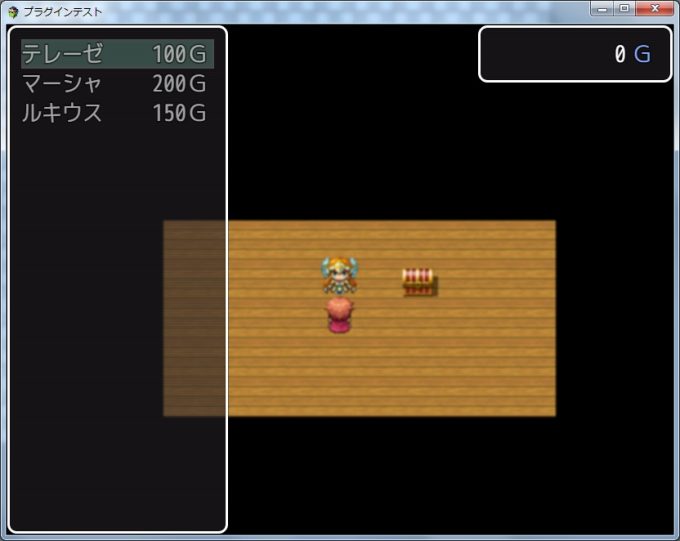
テレーゼに<EASalary:100> 、マーシャに<EASalary:200>、ルキウスに<EASalary:150>を設定してみました。

テストプレイすると、こんな感じで表示されます。

行の有効・無効を切り替える
アクターの一覧を表示するところまではできましたが、所持金が0Gなのにアクター名が白色で表示されています。
しかも、決定ボタンを押すと雇うボタンも押せます。
所持金が足りない場合と、パーティ人数がいっぱいの時は決定ボタンを押しても選択できないようにします。
一覧ウィンドウから所持金を取得できるようにする
所持金の額は、Window_Goldのvalueから取得できます。
しかし、Window_GoldはScene_EmployActorで生成しているため、Window_EmployActorIndexからはWindow_Goldのvalueが取得できません。
そこでScene_EmployActorからWindow_EmployActorIndexに所持金額を渡せるように、メソッドを追加します。
サンプルコード3-1
|
1 2 3 4 5 6 7 8 9 10 11 12 13 14 15 16 17 18 19 20 21 22 23 24 25 26 27 28 29 30 31 32 33 34 35 36 37 38 39 40 41 42 43 44 45 46 47 48 49 50 51 52 53 54 55 56 57 58 59 60 61 62 63 64 65 66 67 68 69 70 71 72 73 74 75 76 77 78 79 80 81 82 83 84 85 86 87 88 89 90 91 92 93 94 95 96 97 98 99 100 101 102 103 104 105 106 107 108 109 110 111 112 113 114 115 116 117 118 119 120 121 122 123 124 125 126 127 128 129 130 131 132 133 134 135 136 137 138 139 140 141 142 143 144 145 146 147 148 149 150 151 152 153 154 155 156 157 158 159 160 161 162 163 164 165 166 167 168 169 170 171 172 173 174 175 176 177 178 179 180 181 182 183 184 185 186 187 188 189 190 191 192 193 194 195 196 197 198 199 200 201 202 203 204 205 206 207 208 209 210 211 212 213 214 215 216 217 218 219 220 221 222 223 224 225 226 227 228 229 230 231 232 233 234 235 236 237 238 239 240 241 242 243 244 245 246 247 248 249 250 251 252 253 254 255 256 257 258 |
(function(){ 'use strict'; var pluginName = "EmployActor"; // ----------プラグインコマンドの定義 ここから ---------- var _Game_Interpreter_pluginCommand = Game_Interpreter.prototype.pluginCommand; Game_Interpreter.prototype.pluginCommand = function(command, args){ _Game_Interpreter_pluginCommand.call(this, command, args); if(command === pluginName){ switch(args[0]){ case 'open': SceneManager.push(Scene_EmployActor); break; } } }; // ----------プラグインコマンドの定義 ここまで ---------- // ----------Sceneの定義 ここから ---------- function Scene_EmployActor(){ this.initialize.apply(this, arguments); } Scene_EmployActor.prototype = Object.create(Scene_MenuBase.prototype); Scene_EmployActor.prototype.constructor = Scene_EmployActor; Scene_EmployActor.prototype.initialize = function(){ Scene_MenuBase.prototype.initialize.call(this); }; // ウィンドウの作成 Scene_EmployActor.prototype.create = function(){ Scene_MenuBase.prototype.create.call(this); this.createIndexWindow(); this.createGoldWindow(); this.createCommandWindow(); this.activateIndexWindow(); }; // アクター一覧ウィンドウ作成処理 Scene_EmployActor.prototype.createIndexWindow = function(){ var wx = 0; var wy = 0; var ww = Graphics.width / 3; var wh = Graphics.height; this._indexWindow = new Window_EmployActorIndex(wx, wy, ww, wh); this._indexWindow.setHandler('ok', this.onIndexOk.bind(this)); this._indexWindow.setHandler('cancel', this.onIndexCancel.bind(this)); this.addWindow(this._indexWindow); }; // 所持金ウィンドウ作成処理 Scene_EmployActor.prototype.createGoldWindow = function(){ this._goldWindow = new Window_Gold(0, 0); var wx = Graphics.width - this._goldWindow.width; this._goldWindow.move(wx, 0, this._goldWindow.width, this._goldWindow.height); this.addWindow(this._goldWindow); }; // コマンドウィンドウ作成処理 Scene_EmployActor.prototype.createCommandWindow = function(){ this._commandWindow = new Window_EmployCommand(0, 0); var wx = Graphics.width - this._commandWindow.width; var wy = Graphics.height - this._commandWindow.height; this._commandWindow.move(wx, wy, this._commandWindow.width, this._commandWindow.height); this._commandWindow.setHandler('employ', this.onCommandEmploy.bind(this)); this._commandWindow.setHandler('cancel', this.onCommandCancel.bind(this)); this.hideCommandWindow(); this.addWindow(this._commandWindow); }; // インデックスウィンドウで決定ボタンを押したときの処理 Scene_EmployActor.prototype.onIndexOk = function(){ this.activateCommandWindow(); }; // インデックスウィンドウでキャンセルボタンを押したときの処理 Scene_EmployActor.prototype.onIndexCancel = function(){ this.popScene(); }; // コマンドウィンドウで雇うボタンを押したときの処理 Scene_EmployActor.prototype.onCommandEmploy = function(){ this.hideCommandWindow(); this.employ(); this.activateIndexWindow(); this._goldWindow.refresh(); }; // コマンドウィンドウでキャンセルボタンを押したときの処理 Scene_EmployActor.prototype.onCommandCancel = function(){ this.hideCommandWindow(); this._indexWindow.activate(); }; // 雇うコマンド Scene_EmployActor.prototype.employ = function(){ // あとで書く }; // 所持金 Scene_EmployActor.prototype.money = function(){ return this._goldWindow.value(); }; // 一覧ウィンドウに所持金をセットして更新する Scene_EmployActor.prototype.activateIndexWindow = function(){ this._indexWindow.setMoney(this.money()); this._indexWindow.activate(); this._indexWindow.refresh(); }; // コマンドウィンドウを表示 Scene_EmployActor.prototype.activateCommandWindow = function(){ this._commandWindow.activate(); this._commandWindow.select(0); this._commandWindow.show(); }; // コマンドウィンドウを非表示 Scene_EmployActor.prototype.hideCommandWindow = function(){ this._commandWindow.deselect(); this._commandWindow.deactivate(); this._commandWindow.hide(); }; // ----------Sceneの定義 ここまで ---------- // ----------インデックスウィンドウの定義 ここから ---------- function Window_EmployActorIndex(){ this.initialize.apply(this, arguments); }; Window_EmployActorIndex.prototype = Object.create(Window_Selectable.prototype); Window_EmployActorIndex.prototype.constructor = Window_EmployActorIndex; Window_EmployActorIndex.prototype.initialize = function(x, y, width, height){ Window_Selectable.prototype.initialize.call(this, x, y, width, height); this.refresh(); this.select(0); this.activate(); }; // 列数 Window_EmployActorIndex.prototype.maxCols = function(){ return 1; }; // アイテム数 Window_EmployActorIndex.prototype.maxItems = function(){ return this._list ? this._list.length : 0; }; // アクターリストを表示 Window_EmployActorIndex.prototype.drawItem = function(index){ var actor = this._list[index]; var salary = actor.meta['EASalary'] + TextManager.currencyUnit; var rect = this.itemRect(index); // 表示 this.drawText(actor.name, rect.x, rect.y, 100); this.drawText(salary, rect.x + 130, rect.y, 100, 'right'); }; // 所持金 Window_EmployActorIndex.prototype.setMoney = function(money){ this._money = money; }; // 再描画処理 Window_EmployActorIndex.prototype.refresh = function(){ this.createContents(); this.makeActorList(); this.drawAllItems(); }; // アクターリストを作る Window_EmployActorIndex.prototype.makeActorList = function(){ this._list = []; // $dataActors[0]はnullなので1から取得 for(var i = 1; i < $dataActors.length; i++ ){ var actor = $dataActors[i]; if(hasTag(actor.meta, 'EASalary') && !isJoinedParty(actor)){ this._list.push(actor); } } }; // タグがあるか function hasTag(obj, tagName){ for(var propertyName in obj){ if(propertyName === tagName){ return true; } } return false; } // パーティに参加しているか function isJoinedParty(actor){ for(var i = 0; i < $gameParty._actors.length; i++ ){ if($gameParty._actors[i] === actor.id){ return true; } } return false; } // ----------インデックスウィンドウの定義 ここまで ---------- // ----------コマンドウィンドウの定義 ここから ---------- function Window_EmployCommand(){ this.initialize.apply(this, arguments); } Window_EmployCommand.prototype = Object.create(Window_Command.prototype); Window_EmployCommand.prototype.constructor = Window_EmployCommand; Window_EmployCommand.prototype.initialize = function(x, y){ Window_Command.prototype.initialize.call(this, x, y); }; // コマンドを設定 Window_EmployCommand.prototype.makeCommandList = function(){ this.addCommand('雇う', 'employ', true); }; // ----------コマンドウィンドウの定義 ここまで ---------- })(); |
Window_EmployActorIndexに setMoneyという所持金を設定するメソッドを追加しました。
Scene_EmployActorの activateIndexWindowメソッドの中でsetMoneyを呼び出し、所持金を渡しています。
パーティの持っている所持金は $gameParty._gold でも取得できるので回りくどい気がしますが、ショップで買う時の内部処理(Window_ShopBuy)がこういう処理をしていたので、いちおう合わせました。
パーティの最大人数を定義する
パーティ人数がいっぱいの時を判定できるように、パーティの最大人数を定義します。
パーティの最大人数はデフォルトだと4人ですが、プラグインでパーティの最大人数を増やしている人もいるのでパラメータで設定できるようにします。
ついでにほかのプラグインの説明も書いておきます。
サンプルコード3-2
|
1 2 3 4 5 6 7 8 9 10 11 12 13 14 15 16 17 18 19 20 21 22 23 24 25 26 27 28 29 30 31 32 33 34 35 36 37 38 39 40 41 42 43 44 45 46 47 48 49 50 51 52 53 54 55 56 57 58 59 60 61 62 |
// ====================== // EmployActor.js // ====================== /*: * @plugindesc Employ Actor with money * @author Moooty * * @param maxParty * @desc Max capacity in party. * @default 4 * @type Number * @help * Plugin Command: * open # open employ screen. * * Actor's Note tag: * <EASalary: 100> # employ actor 100 gold. */ /*:ja * @plugindesc お金で仲間を雇うプラグイン * @author むーてぃ * * @param maxParty * @desc パーティの最大人数 * @default 4 * @type Number * * @help * プラグインコマンド: * open # 雇用画面を開く * * アクターのメモ欄: * <EASalary: 100> # 賃金を100Gにする */ (function(){ 'use strict'; var pluginName = "EmployActor"; var parameters = PluginManager.parameters(pluginName); var maxParty = String(parameters['maxParty'] || 4); // ----------プラグインコマンドの定義 ここから ---------- var _Game_Interpreter_pluginCommand = Game_Interpreter.prototype.pluginCommand; Game_Interpreter.prototype.pluginCommand = function(command, args){ _Game_Interpreter_pluginCommand.call(this, command, args); if(command === pluginName){ switch(args[0]){ case 'open': SceneManager.push(Scene_EmployActor); break; } } }; // ----------プラグインコマンドの定義 ここまで ---------- |
お金が足りない時とパーティがいっぱいの時は選択できないようにする
これで所持金とパーティの最大人数が取得できるようになったので、行の有効・無効を判定できます。
行の有効・無効を切り替えるには、 isCurrentItemEnabledメソッドを使います。
サンプルコード3-3
|
1 2 3 4 5 6 7 8 9 10 11 12 13 14 15 16 17 18 19 20 21 22 23 24 25 26 27 28 29 30 31 32 33 34 35 36 37 38 39 40 41 42 43 44 45 46 47 48 49 50 51 52 53 54 55 56 57 58 59 60 61 62 63 64 65 66 67 68 69 70 71 72 73 74 75 76 77 78 79 80 81 82 83 84 85 86 87 88 89 90 91 92 93 94 95 96 97 98 99 100 101 102 103 104 105 106 107 |
// ----------インデックスウィンドウの定義 ここから ---------- function Window_EmployActorIndex(){ this.initialize.apply(this, arguments); }; Window_EmployActorIndex.prototype = Object.create(Window_Selectable.prototype); Window_EmployActorIndex.prototype.constructor = Window_EmployActorIndex; Window_EmployActorIndex.prototype.initialize = function(x, y, width, height){ Window_Selectable.prototype.initialize.call(this, x, y, width, height); this.refresh(); this.select(0); this.activate(); }; // 列数 Window_EmployActorIndex.prototype.maxCols = function(){ return 1; }; // アイテム数 Window_EmployActorIndex.prototype.maxItems = function(){ return this._list ? this._list.length : 0; }; // アクターリストを表示 Window_EmployActorIndex.prototype.drawItem = function(index){ var actor = this._list[index]; var salary = actor.meta['EASalary'] + TextManager.currencyUnit; var rect = this.itemRect(index); // 表示 this.drawText(actor.name, rect.x, rect.y, 100); this.drawText(salary, rect.x + 130, rect.y, 100, 'right'); }; // 選択しているアクター Window_EmployActorIndex.prototype.selectedItem = function(){ return this._list[this.index()]; }; // 選択できるか Window_EmployActorIndex.prototype.isCurrentItemEnabled = function(){ return this.isEnabled(this.selectedItem()); }; // 使用可能か Window_EmployActorIndex.prototype.isEnabled = function(actor){ if(actor){ var hasPartyCapacity = $gameParty._actors.length < maxParty; var hasMoney = actor.meta['EASalary'] <= this._money; } return hasPartyCapacity && hasMoney; }; // 所持金 Window_EmployActorIndex.prototype.setMoney = function(money){ this._money = money; }; // 再描画処理 Window_EmployActorIndex.prototype.refresh = function(){ this.createContents(); this.makeActorList(); this.drawAllItems(); }; // アクターリストを作る Window_EmployActorIndex.prototype.makeActorList = function(){ this._list = []; // $dataActors[0]はnullなので1から取得 for(var i = 1; i < $dataActors.length; i++ ){ var actor = $dataActors[i]; if(hasTag(actor.meta, 'EASalary') && !isJoinedParty(actor)){ this._list.push(actor); } } }; // タグがあるか function hasTag(obj, tagName){ for(var propertyName in obj){ if(propertyName === tagName){ return true; } } return false; } // パーティに参加しているか function isJoinedParty(actor){ for(var i = 0; i < $gameParty._actors.length; i++ ){ if($gameParty._actors[i] === actor.id){ return true; } } return false; } // ----------インデックスウィンドウの定義 ここまで ---------- |
isCurrentItemEnabledがtrueの時には決定ボタンで選択可能になります。
falseの時は決定ボタンを押すとブブーッという効果音が鳴り、決定ボタンを押した時の処理が呼ばれなくなります。
お金が足りるかとパーティの最大人数未満かを判定する isEnabledメソッドを作り、戻り値をisCurrentItemEnabledで使っています。
選択中のアクターはこれから雇うコマンドを作る時にも取得したいので、 selectedItemメソッドを作って取得できるようにしました。
項目を選択できない時に文字をグレーアウトする
isCurrentItemEnabledは項目を押せなくなるだけで、文字色までは変わりません。
文字をグレーアウトするには changePaintOpacityメソッドを使います。
trueの時には通常の白い文字、falseの時には文字の不透明度が下がりグレーになります。
ついでに、 meta['EASalary'] と書いているところが多いので、ノートタグ名を変数にしておきます。
ノートタグの名前を変えたくなった時に、1か所なおすだけですみます。
サンプルコード3-4
|
1 2 3 4 5 6 7 8 |
(function(){ 'use strict'; var pluginName = "EmployActor"; var tagName = "EASalary"; var parameters = PluginManager.parameters(pluginName); var maxParty = String(parameters['maxParty'] || 4); |
コード中略(省略部分は変更なし)
|
1 2 3 4 5 6 7 8 9 10 11 12 13 14 15 16 17 18 19 20 21 22 23 24 25 26 27 28 29 30 31 32 33 34 35 36 37 38 39 40 41 42 43 44 45 46 47 48 49 50 51 52 53 54 55 56 57 58 59 60 61 62 63 64 65 66 67 68 69 70 71 72 73 74 75 76 77 78 79 80 81 82 83 84 85 86 87 88 89 90 91 92 93 94 95 96 97 98 99 100 101 102 103 104 105 106 107 108 109 110 111 112 |
// ----------インデックスウィンドウの定義 ここから ---------- function Window_EmployActorIndex(){ this.initialize.apply(this, arguments); }; Window_EmployActorIndex.prototype = Object.create(Window_Selectable.prototype); Window_EmployActorIndex.prototype.constructor = Window_EmployActorIndex; Window_EmployActorIndex.prototype.initialize = function(x, y, width, height){ Window_Selectable.prototype.initialize.call(this, x, y, width, height); this.refresh(); this.select(0); this.activate(); }; // 列数 Window_EmployActorIndex.prototype.maxCols = function(){ return 1; }; // アイテム数 Window_EmployActorIndex.prototype.maxItems = function(){ return this._list ? this._list.length : 0; }; // アクターリストを表示 Window_EmployActorIndex.prototype.drawItem = function(index){ var actor = this._list[index]; var salary = actor.meta[tagName] + TextManager.currencyUnit; var rect = this.itemRect(index); // 文字色を変更 this.changePaintOpacity(this.isEnabled(actor)); // 表示 this.drawText(actor.name, rect.x, rect.y, 100); this.drawText(salary, rect.x + 130, rect.y, 100, 'right'); }; // 選択しているアクター Window_EmployActorIndex.prototype.selectedItem = function(){ return this._list[this.index()]; }; // 選択できるか Window_EmployActorIndex.prototype.isCurrentItemEnabled = function(){ return this.isEnabled(this.selectedItem()); }; // 使用可能か Window_EmployActorIndex.prototype.isEnabled = function(actor){ if(actor){ var hasPartyCapacity = $gameParty._actors.length < maxParty; var hasMoney = actor.meta[tagName] <= this._money; } return hasPartyCapacity && hasMoney; }; // 所持金 Window_EmployActorIndex.prototype.setMoney = function(money){ this._money = money; }; // 再描画処理 Window_EmployActorIndex.prototype.refresh = function(){ this.createContents(); this.makeActorList(); this.drawAllItems(); }; // アクターリストを作る Window_EmployActorIndex.prototype.makeActorList = function(){ this._list = []; // $dataActors[0]はnullなので1から取得 for(var i = 1; i < $dataActors.length; i++ ){ var actor = $dataActors[i]; if(hasTag(actor.meta, tagName) && !isJoinedParty(actor)){ this._list.push(actor); } } }; // タグがあるか function hasTag(obj, tagName){ for(var propertyName in obj){ if(propertyName === tagName){ return true; } } return false; } // パーティに参加しているか function isJoinedParty(actor){ for(var i = 0; i < $gameParty._actors.length; i++ ){ if($gameParty._actors[i] === actor.id){ return true; } } return false; } // ----------インデックスウィンドウの定義 ここまで ---------- |
文字色がグレーになって押せなくなりました。
お金が手に入るイベントを別につくり、ゴールドを増やしてから開くとキチンと選択できるようになります。
あとは雇うコマンドの内容を作っていきます。
コマンドボタンを押した時の処理を作る
最初にScene_EmployActorを定義したときにemployメソッドも名前だけ定義して // あとで書く とコメントを書いておいたので、そこに処理を書いています。
|
1 2 3 4 5 6 7 8 9 10 |
// 雇うコマンド Scene_EmployActor.prototype.employ = function(){ var actor = this._indexWindow.selectedItem(); if(actor){ var salary = Number(actor.meta[tagName]); $gameParty.loseGold(salary); $gameParty.addActor(actor.id); } }; |
一覧で選択したアイテムはWindow_EmployActorIndexの selectedItemから取得できるようにしたので、選択されたアクターを取得します。
ノートタグから賃金を取得し、 $gameParty.loseGold でお金を減らして $gameParty.addActor でアクターをパーティに追加するだけです。
デバッグと細かい修正
プラグインの挙動に問題がないか、チェックします。
ゴールドを増やすイベントを設置し、ウィンドウを開いてみます。
ちゃんと選択できますね。
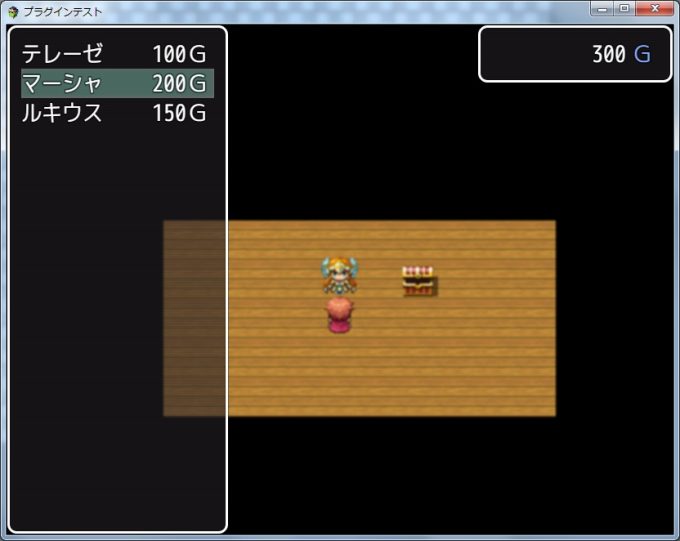
雇うと雇った人はリストから消え、金額の足りなくなった人はグレーアウトされます。
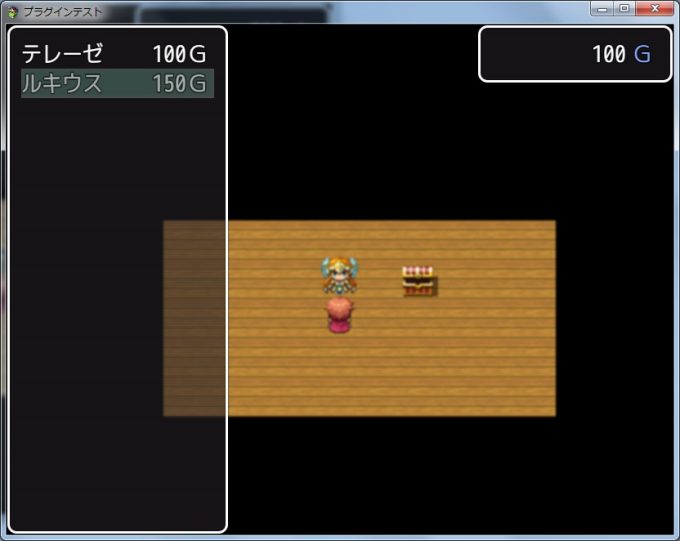
データが変わってもウィンドウをrefreshしないとウィンドウの表示は更新されないので、Scene_EmployActorの activateIndexWindowメソッドの中でWindow_EmployActorIndexをrefreshし、employメソッドの最後で呼び出すことでカーソルを一覧に戻しつつ、データを更新しているところがポイントです。
おおむねいい感じですが、項目の最後の人を選択すると空白行が残ってしまいました。

最後にカーソルをあわせた位置は、 lastIndexプロパティに入っています。
しかしlastIndexの値はウィンドウをrefreshして項目が減った場合でも変わらないため、データがない行が選択されてしまいます。
refreshメソッドの処理を追加して、カーソル位置を調整します。
|
1 2 3 4 5 6 7 8 9 10 11 |
// 再描画処理 Window_EmployActorIndex.prototype.refresh = function(){ this.createContents(); this.makeActorList(); this.drawAllItems(); // 最後の項目を選択した時にカーソルを1つ上の項目にセット if(this.lastIndex > this._list.length - 1){ this.select(this._list.length - 1); } }; |
一覧のn番めの人を選択する(カーソルをうつす)には selectメソッドを使います。
指定したインデックス番号の項目にカーソルが移動します。
インデックス番号は0から始まります。
ウィンドウ描画時にlastIndexをの値がアクターの配列の要素数-1より大きかったら、lastIndexに配列の要素数-1を代入します。
lastIndexが3で一覧に表示されるアクターが2人だったらインデックス1番(リストの2番めの人)にカーソルが移ります。
Window_Selectableを使ったサンプルコード(最終版)
|
1 2 3 4 5 6 7 8 9 10 11 12 13 14 15 16 17 18 19 20 21 22 23 24 25 26 27 28 29 30 31 32 33 34 35 36 37 38 39 40 41 42 43 44 45 46 47 48 49 50 51 52 53 54 55 56 57 58 59 60 61 62 63 64 65 66 67 68 69 70 71 72 73 74 75 76 77 78 79 80 81 82 83 84 85 86 87 88 89 90 91 92 93 94 95 96 97 98 99 100 101 102 103 104 105 106 107 108 109 110 111 112 113 114 115 116 117 118 119 120 121 122 123 124 125 126 127 128 129 130 131 132 133 134 135 136 137 138 139 140 141 142 143 144 145 146 147 148 149 150 151 152 153 154 155 156 157 158 159 160 161 162 163 164 165 166 167 168 169 170 171 172 173 174 175 176 177 178 179 180 181 182 183 184 185 186 187 188 189 190 191 192 193 194 195 196 197 198 199 200 201 202 203 204 205 206 207 208 209 210 211 212 213 214 215 216 217 218 219 220 221 222 223 224 225 226 227 228 229 230 231 232 233 234 235 236 237 238 239 240 241 242 243 244 245 246 247 248 249 250 251 252 253 254 255 256 257 258 259 260 261 262 263 264 265 266 267 268 269 270 271 272 273 274 275 276 277 278 279 280 281 282 283 284 285 286 287 288 289 290 291 292 293 294 295 296 297 298 299 300 301 302 303 304 305 306 307 308 309 310 311 312 313 314 315 316 317 318 319 320 321 322 323 324 325 326 327 328 329 330 331 332 333 334 335 |
// ====================== // EmployActor.js // ====================== /*: * @plugindesc Employ Actor with money * @author Moooty * * @param maxParty * @desc Max capacity in party. * @default 4 * @type Number * @help * Plugin Command: * open # open employ screen. * * Actor's Note tag: * <EASalary: 100> # employ actor 100 gold. */ /*:ja * @plugindesc お金で仲間を雇うプラグイン * @author むーてぃ * * @param maxParty * @desc パーティの最大人数 * @default 4 * @type Number * * @help * プラグインコマンド: * open # 雇用画面を開く * * アクターのメモ欄: * <EASalary: 100> # 賃金を100Gにする */ (function(){ 'use strict'; var pluginName = "EmployActor"; var tagName = "EASalary"; var parameters = PluginManager.parameters(pluginName); var maxParty = String(parameters['maxParty'] || 4); // ----------プラグインコマンドの定義 ここから ---------- var _Game_Interpreter_pluginCommand = Game_Interpreter.prototype.pluginCommand; Game_Interpreter.prototype.pluginCommand = function(command, args){ _Game_Interpreter_pluginCommand.call(this, command, args); if(command === pluginName){ switch(args[0]){ case 'open': SceneManager.push(Scene_EmployActor); break; } } }; // ----------プラグインコマンドの定義 ここまで ---------- // ----------Sceneの定義 ここから ---------- function Scene_EmployActor(){ this.initialize.apply(this, arguments); } Scene_EmployActor.prototype = Object.create(Scene_MenuBase.prototype); Scene_EmployActor.prototype.constructor = Scene_EmployActor; Scene_EmployActor.prototype.initialize = function(){ Scene_MenuBase.prototype.initialize.call(this); }; // ウィンドウの作成 Scene_EmployActor.prototype.create = function(){ Scene_MenuBase.prototype.create.call(this); this.createIndexWindow(); this.createGoldWindow(); this.createCommandWindow(); this.activateIndexWindow(); }; // アクター一覧ウィンドウ作成処理 Scene_EmployActor.prototype.createIndexWindow = function(){ var wx = 0; var wy = 0; var ww = Graphics.width / 3; var wh = Graphics.height; this._indexWindow = new Window_EmployActorIndex(wx, wy, ww, wh); this._indexWindow.setHandler('ok', this.onIndexOk.bind(this)); this._indexWindow.setHandler('cancel', this.onIndexCancel.bind(this)); this.addWindow(this._indexWindow); }; // 所持金ウィンドウ作成処理 Scene_EmployActor.prototype.createGoldWindow = function(){ this._goldWindow = new Window_Gold(0, 0); var wx = Graphics.width - this._goldWindow.width; this._goldWindow.move(wx, 0, this._goldWindow.width, this._goldWindow.height); this.addWindow(this._goldWindow); }; // コマンドウィンドウ作成処理 Scene_EmployActor.prototype.createCommandWindow = function(){ this._commandWindow = new Window_EmployCommand(0, 0); var wx = Graphics.width - this._commandWindow.width; var wy = Graphics.height - this._commandWindow.height; this._commandWindow.move(wx, wy, this._commandWindow.width, this._commandWindow.height); this._commandWindow.setHandler('employ', this.onCommandEmploy.bind(this)); this._commandWindow.setHandler('cancel', this.onCommandCancel.bind(this)); this.hideCommandWindow(); this.addWindow(this._commandWindow); }; // インデックスウィンドウで決定ボタンを押したときの処理 Scene_EmployActor.prototype.onIndexOk = function(){ this.activateCommandWindow(); }; // インデックスウィンドウでキャンセルボタンを押したときの処理 Scene_EmployActor.prototype.onIndexCancel = function(){ this.popScene(); }; // コマンドウィンドウで雇うボタンを押したときの処理 Scene_EmployActor.prototype.onCommandEmploy = function(){ this.hideCommandWindow(); this.employ(); this.activateIndexWindow(); this._goldWindow.refresh(); }; // コマンドウィンドウでキャンセルボタンを押したときの処理 Scene_EmployActor.prototype.onCommandCancel = function(){ this.hideCommandWindow(); this._indexWindow.activate(); }; // 雇うコマンド Scene_EmployActor.prototype.employ = function(){ var actor = this._indexWindow.selectedItem(); if(actor){ var salary = Number(actor.meta[tagName]); $gameParty.loseGold(salary); $gameParty.addActor(actor.id); } }; // 所持金 Scene_EmployActor.prototype.money = function(){ return this._goldWindow.value(); }; // 一覧ウィンドウに所持金をセットして更新する Scene_EmployActor.prototype.activateIndexWindow = function(){ this._indexWindow.setMoney(this.money()); this._indexWindow.activate(); this._indexWindow.refresh(); }; // コマンドウィンドウを表示 Scene_EmployActor.prototype.activateCommandWindow = function(){ this._commandWindow.activate(); this._commandWindow.select(0); this._commandWindow.show(); }; // コマンドウィンドウを非表示 Scene_EmployActor.prototype.hideCommandWindow = function(){ this._commandWindow.deselect(); this._commandWindow.deactivate(); this._commandWindow.hide(); }; // ----------Sceneの定義 ここまで ---------- // ----------インデックスウィンドウの定義 ここから ---------- function Window_EmployActorIndex(){ this.initialize.apply(this, arguments); }; Window_EmployActorIndex.prototype = Object.create(Window_Selectable.prototype); Window_EmployActorIndex.prototype.constructor = Window_EmployActorIndex; Window_EmployActorIndex.prototype.initialize = function(x, y, width, height){ Window_Selectable.prototype.initialize.call(this, x, y, width, height); this.refresh(); this.select(0); this.activate(); }; // 列数 Window_EmployActorIndex.prototype.maxCols = function(){ return 1; }; // アイテム数 Window_EmployActorIndex.prototype.maxItems = function(){ return this._list ? this._list.length : 0; }; // アクターリストを表示 Window_EmployActorIndex.prototype.drawItem = function(index){ var actor = this._list[index]; var salary = actor.meta[tagName] + TextManager.currencyUnit; var rect = this.itemRect(index); // 文字色を変更 this.changePaintOpacity(this.isEnabled(actor)); // 表示 this.drawText(actor.name, rect.x, rect.y, 100); this.drawText(salary, rect.x + 130, rect.y, 100, 'right'); }; // 選択しているアクター Window_EmployActorIndex.prototype.selectedItem = function(){ return this._list[this.index()]; }; // 選択できるか Window_EmployActorIndex.prototype.isCurrentItemEnabled = function(){ return this.isEnabled(this.selectedItem()); }; // 使用可能か Window_EmployActorIndex.prototype.isEnabled = function(actor){ if(actor){ var hasPartyCapacity = $gameParty._actors.length < maxParty; var hasMoney = actor.meta[tagName] <= this._money; } return hasPartyCapacity && hasMoney; }; // 所持金 Window_EmployActorIndex.prototype.setMoney = function(money){ this._money = money; }; // 再描画処理 Window_EmployActorIndex.prototype.refresh = function(){ this.createContents(); this.makeActorList(); this.drawAllItems(); // 最後の項目を選択した時にカーソルを1つ上の項目にセット if(this.lastIndex > this._list.length - 1){ this.select(this._list.length - 1); } }; // アクターリストを作る Window_EmployActorIndex.prototype.makeActorList = function(){ this._list = []; // $dataActors[0]はnullなので1から取得 for(var i = 1; i < $dataActors.length; i++ ){ var actor = $dataActors[i]; if(hasTag(actor.meta, tagName) && !isJoinedParty(actor)){ this._list.push(actor); } } }; // タグがあるか function hasTag(obj, tagName){ for(var propertyName in obj){ if(propertyName === tagName){ return true; } } return false; } // パーティに参加しているか function isJoinedParty(actor){ for(var i = 0; i < $gameParty._actors.length; i++ ){ if($gameParty._actors[i] === actor.id){ return true; } } return false; } // ----------インデックスウィンドウの定義 ここまで ---------- // ----------コマンドウィンドウの定義 ここから ---------- function Window_EmployCommand(){ this.initialize.apply(this, arguments); } Window_EmployCommand.prototype = Object.create(Window_Command.prototype); Window_EmployCommand.prototype.constructor = Window_EmployCommand; Window_EmployCommand.prototype.initialize = function(x, y){ Window_Command.prototype.initialize.call(this, x, y); }; // コマンドを設定 Window_EmployCommand.prototype.makeCommandList = function(){ this.addCommand('雇う', 'employ', true); }; // ----------コマンドウィンドウの定義 ここまで ---------- })(); |
今回はWindow_Selectableの使い方を紹介するのが目的なので、機能は必要最低限にしています。
実際にゲームに使う場合は、画面の空いているところに選択しているアクターのステータスを表示させたり、雇うたびに好感度があがっていって賃金が安くなるみたいなシステムを組み込んでもよいかと思います。